

Importing and exporting
Every feature in a project is stored in WGS84 (EPSG:4326). Vector imports are converted to it on the way in, and every vector export is written in it.
Formats at a glance
Section titled “Formats at a glance”| Format | Files | Reads | Writes | Covered in |
|---|---|---|---|---|
| GPX | .gpx | Yes | Yes | GPX |
| KML | .kml | Yes | Yes | KML and KMZ |
| KMZ | .kmz | Yes | No | KML and KMZ |
| GeoJSON | .geojson, .json | Yes | Yes, as .geojson | GeoJSON |
| GeoPackage | .gpkg, .geopackage | Yes | Yes, as .gpkg | GeoPackage |
| GeoTIFF | .tif, .tiff | Yes | Shared as the image file, never converted | Raster overlays |
| GeoPDF | .pdf | Yes | Shared as the PDF, never converted | GeoPDF import |
| World file, projection file | .tfw, .wld, .tifw, .tiffw, .prj | When picked together with the TIFF | No | Sidecar files |
| Basemap | Built on the device | — | Never exported or shared | Basemaps |
| TopoKit project | .mapproject | Yes | Yes | The project file |
Importing a file
Section titled “Importing a file”On Mac, choose Add Vector Layer… from the Add Data menu in the tool sidebar, from the plus menu in the Layers tab, or from the Layer menu, and pick one or more files. You can also drag files from Finder onto the open project’s map, or open a file with TopoKit from Finder, which takes GeoJSON only as .geojson and a GeoPackage only as .gpkg. A dropped .mapproject opens as a project and a dropped TIFF or PDF as a raster overlay; any other type is ignored.
On iPhone, tap Add Data in the tool sidebar or plus in the Layers tab, choose Add Vector Layer…, and pick one or more files. A file opened in TopoKit from the Files app or another app is imported the same way, except a .json or .geopackage file, which only the picker reads.
A file opened in TopoKit while no project is open waits, and is imported into the next project you open. TopoKit picks the reader from the file extension, so a GPX or KML file saved as .xml is refused as an unsupported format. Files picked together are imported one after another: a file that fails does not stop the rest, and the alert gives the reason for the first failure only.
Without the full app, importing a vector or raster file brings up the Unlock TopoKit sheet and nothing is added; opening a .mapproject, exporting, sharing and copying do not need it (What asks you to unlock).
What happens on import
Section titled “What happens on import”Each file becomes one folder named after the file, added at the top of the Layers tab, with every feature as a row directly inside it. KML folder nesting, GPX’s split into waypoints, routes and tracks, and a GeoPackage’s feature tables do not become subfolders. The map does not move to the new data; choose Zoom to on the folder to go to it.
Styling in the file is not read. Imported features take their style from Settings → Features, lines and polygons from Imported Files and points from Default Style under Points, copied onto each feature at import, so a later change leaves earlier imports as they were.
One Undo removes an import’s folder and every feature in it (Undo and redo).
A GPX or KML file with no feature TopoKit can read, or a GeoPackage whose feature tables hold none it can read, still adds its folder, empty. On Mac, an import that skipped or changed something ends with an alert titled Imported, With Gaps or Imported, With Notes, giving the number of features imported, the number skipped, and the first three reasons.
Every vector format is capped at 100 MB a file, checked before any of it is read; a KMZ must be under the cap both as the archive and as the KML inside it.
Exporting and sharing
Section titled “Exporting and sharing”Several rows exported together always become one file.
On Mac, right-click a row or a selection of rows and choose Export to File, or select them and choose Layer → Export to File… (Cmd-E). To export rows from different places in the tree, click Select in the Layers tab, check the rows and click Export in the action bar.
On iPhone, tap a row’s Layer options button and choose Export to File, or tap Select, check the rows and tap Export in the action bar.
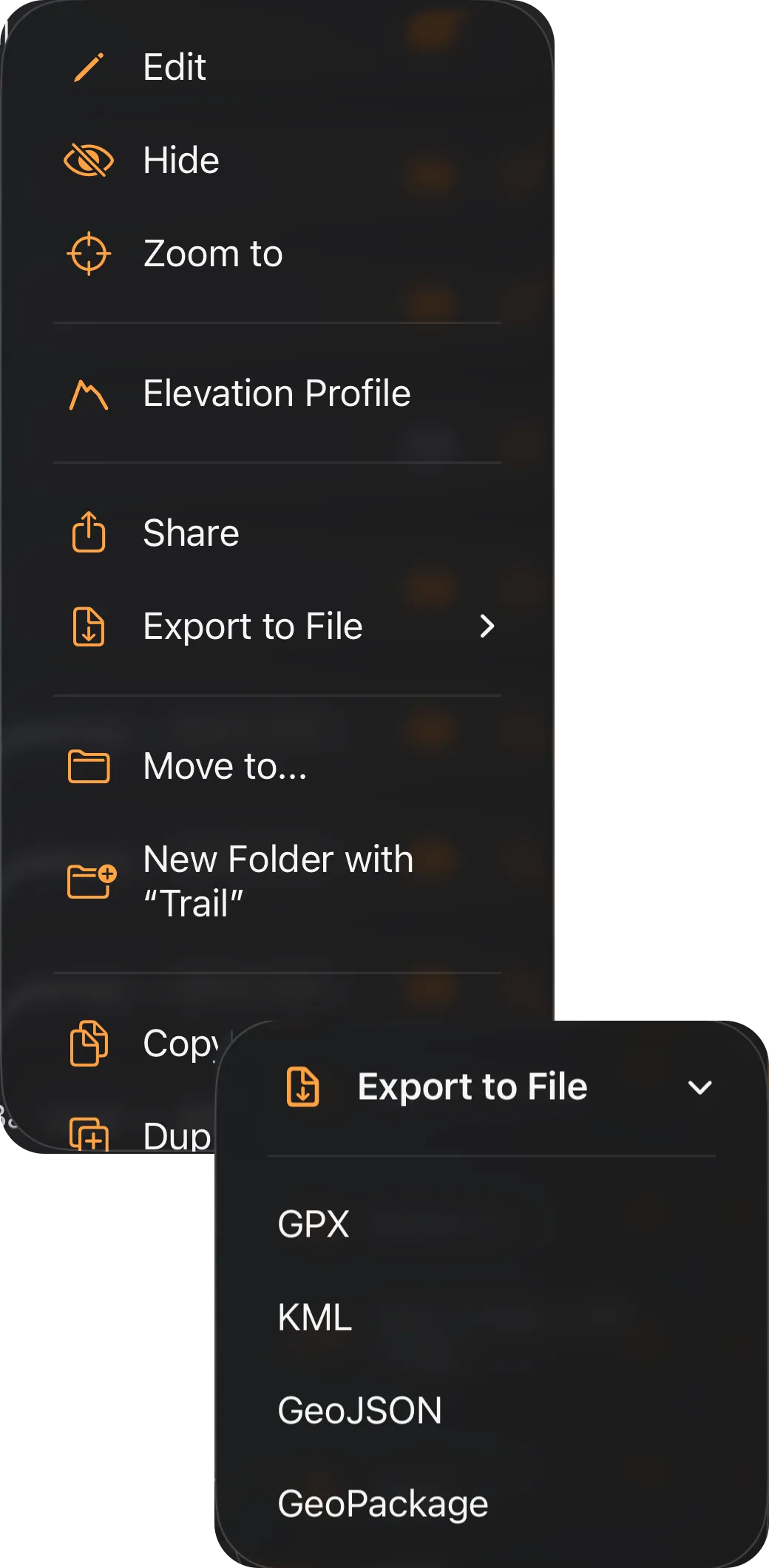
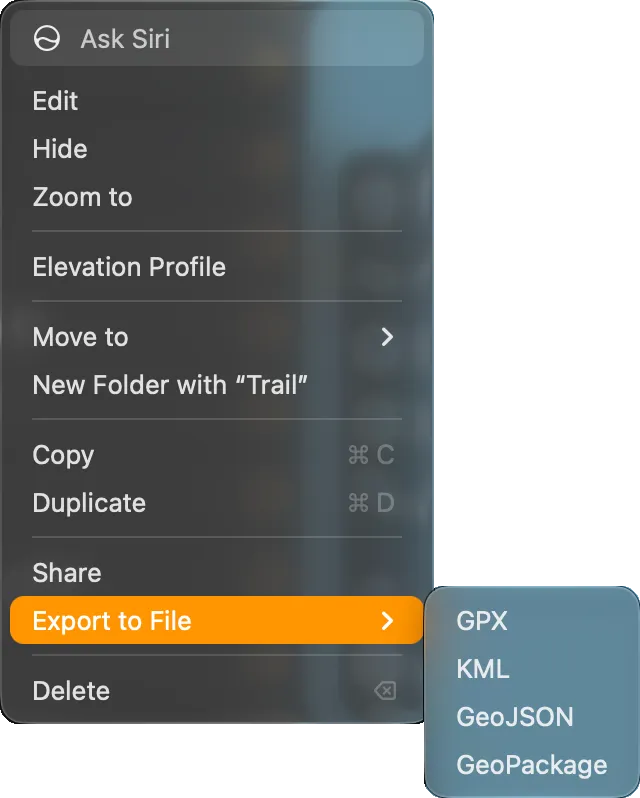
Share, in the same menus and action bar and in the Mac Layer menu, asks for a format for vector features, then opens the share sheet with the file instead of asking where to save it. Sharing a folder sends the image files of its raster overlays beside the vector file.
To send one feature from the map, use Share on its card (The card’s buttons).
What an export contains
Section titled “What an export contains”Only vector features are written, including hidden rows and everything in a folder’s subfolders. Raster overlays and tile layers in a folder or selection are left out, and Export in the action bar stays unavailable until the selection holds a vector feature.
To export a whole project to these formats, select your top-level rows in Select mode and export them together; exporting the project itself writes the .mapproject file instead (The project file).
Attributes are written in all four formats; styling is not.
A feature with photos, exported, shared or copied from the Layers tab, gets a photo_paths attribute in every format: each photo’s path inside the project folder, such as Photos/<id>.jpg, separated by |. The photo files are not exported, and importing the file again does not reattach them.
Format by format
Section titled “Format by format”TopoKit reads GPX 1.1. Waypoints arrive as points, routes and tracks as lines; a track with several segments arrives as one line in several parts.
A line with a timestamp on any point keeps its parts exactly as recorded. In a line without, parts with fewer than two points or under 5 m long are left out, unless that would leave none, and the rest are joined end to end by proximity, which can reverse a part. The same rule applies to a line in several parts in any format, and the import alert says how many lines it changed.
Per-point elevation and time are read from any GPX; horizontal accuracy only from a <topokit:hAccuracy> element in a point’s <extensions>, the element TopoKit writes. A <time> with no time zone is read as UTC, so a device that logs local time without a zone arrives shifted by its UTC offset. The name comes from <name> and the description from <desc> and <cmt>. Other attributes are read only from TopoKit’s own extensions; extensions written by other apps, and track colours and icons, are dropped.
When TopoKit writes GPX, points become <wpt> and every line becomes a <trk>, never a <rte>. A multi-point feature is written as one <wpt> per point, each with the feature’s name and description, so it comes back as separate points. Every attribute except name and description goes into the element’s <extensions>, and TopoKit reads them back. A recorded track’s statistics are also appended to <desc> as readable text, always metric and in English whatever your settings.
Polygons cannot be written to GPX: an export of nothing but polygons is refused with an alert, and in an export that also holds points or lines the polygons are left out.
KML and KMZ
Section titled “KML and KMZ”KML is read from <Placemark>: points, lines and polygons with holes, with <description> and <ExtendedData> attributes in either form, <Data> entries or typed <SchemaData> and <SimpleData>. Altitude becomes each vertex’s elevation, except a 0 under clampToGround, KML’s default mode, which reads as no elevation rather than sea level. <gx:Track> and <gx:MultiTrack> arrive with their per-point times and accuracy.
A <MultiGeometry> or <gx:MultiTrack> is split: each part becomes its own feature with the placemark’s name and attributes, so a placemark holding three polygons becomes three polygons. A MultiPoint, MultiLineString or MultiPolygon in GeoJSON or GeoPackage stays one feature in several parts.
For a KMZ, TopoKit opens the archive and reads the first .kml inside it; other KML documents, icons and overlays in the archive are ignored.
TopoKit writes OGC KML 2.2: one <Document> with one <Placemark> per feature. A feature in several parts uses <MultiGeometry>, and polygon holes are kept. Attributes are written as typed <SimpleData> in <ExtendedData>, declared once in the document’s <Schema> as int, double, bool or string, a number or a boolean only when every exported value is one by the rule under GeoJSON.
A recorded track, and any line with a time on any vertex, is written as <gx:Track> or <gx:MultiTrack> with per-point time, altitude and accuracy. Every placemark gets one of three fixed styles, a yellow pushpin, a red line or a translucent red polygon, so your colours, widths and pins do not appear.
GeoJSON
Section titled “GeoJSON”TopoKit reads RFC 7946 GeoJSON: a FeatureCollection, a lone Feature or a bare geometry. A GeometryCollection becomes separate features sharing one properties block. A third coordinate value is read as the vertex’s elevation.
Every properties key is kept as text: numbers as their plain decimal text, so 1.50 arrives as 1.5, booleans as true or false, null dropped, nested objects and arrays as JSON text. A feature’s own top-level id is kept as an attribute named id unless properties already has one. The name comes from a name, title or label key. coordTimes and coordHorizontalAccuracy in properties are read as a line’s per-point times and accuracies, not as attributes.
A legacy "crs" member is read. When it names an EPSG code other than 4326, every feature is reprojected to WGS84 on the way in, and a feature still out of range afterwards is skipped. A "crs" member TopoKit cannot read, or one that names neither CRS84 nor an EPSG code, is ignored with a note in the import alert, and the coordinates are read as longitude, latitude.
TopoKit writes an RFC 7946 FeatureCollection, with sorted keys so two exports diff cleanly. Coordinates are [lon, lat], or [lon, lat, elevation] when any vertex of the feature has a height, with 0 for a vertex without one. Polygon rings are written exterior counterclockwise and holes clockwise, so a ring drawn or imported the other way round exports with its vertices reversed.
Values are typed on the way out. Text becomes a number only when the number prints back as exactly the same text, true and false in any capitalization become booleans, and everything else stays text, so a site_id of 007 or a reading of 1.50 exports unchanged as text.
A name attribute is written in place of the feature’s own name, so a feature renamed in TopoKit exports under the name it was imported with. A line’s per-point times and accuracies go out as coordTimes and coordHorizontalAccuracy; the time and accuracy a point was imported with, such as a GPX waypoint’s <time>, are not written.
GeoPackage
Section titled “GeoPackage”Every column except the geometry and the table’s integer primary key, usually fid, becomes a text attribute: a BOOLEAN column reads as true or false, and NULL and BLOB values are left out. A name or title column, in any capitalization, sets the feature’s name and stays an attribute as well.
Z becomes each vertex’s elevation. M becomes a per-point time when it reads as Unix time in seconds or milliseconds, and is dropped otherwise, so a measure such as a milepost is not mistaken for a date. A layer in a coordinate system other than WGS84 is reprojected on the way in; where a transform fails, the raw coordinates are kept and the import alert says so. Raster tile tables, attribute-only tables and styling are not read.
TopoKit writes an OGC GeoPackage with features split into points, lines and polygons tables, skipping any that would be empty, all tagged SRS 4326. Each attribute gets its own column, every character in its name other than the letters A to Z, the digits 0 to 9 and the underscore turned into an underscore, so site id becomes site_id and Höhe becomes H_he. A column is INTEGER when every value is a whole number, REAL when every value is a number, BOOLEAN when every value is true or false, and TEXT otherwise, by the rule under GeoJSON.
A column name already taken, by another attribute or by the table’s own fid, geom and name columns in any capitalization, takes a numbered suffix: an attribute called name is written as name_2. A file imported with a name column therefore exports with both name, the feature’s current name, and name_2, the attribute.
Each feature gets only the dimensions it has: Z when any of its vertices has a height, with 0 for a vertex without one, and M, the time in milliseconds since 1970, only on a line with a time on every vertex. A line’s per-vertex horizontal accuracy goes in a related table written with the OGC Related Tables Extension; a point’s is not written as a vertex value.
Coordinate validation
Section titled “Coordinate validation”A coordinate must fall between −90 and 90 latitude and −180 and 180 longitude.
- GPX and KML: the vertex is dropped without a note and the rest of the line is kept, running straight from the vertex before it to the one after. A GPX waypoint out of range is skipped with a note in the import alert; a KML point is dropped without one. KML longitude is brought into range first, so a KML vertex is only dropped for its latitude.
- GeoJSON: the whole feature is skipped if any coordinate is out of range, with a note in the import alert. A file left with no features fails with an alert giving the reasons, so a lone
Featureor a bare geometry with one bad coordinate fails the whole import. Inside aGeometryCollectiononly the bad part is dropped, without a note. - GeoPackage: out-of-range coordinates are kept, and the import alert gives how many there are.
Why are my imported features in the wrong place? Each format fixes its axis order in its specification, so TopoKit never guesses. Features in the wrong hemisphere, or mirrored, mean the file was written with its coordinates swapped; fix it in your desktop GIS and import it again. The other cause is a coordinate system TopoKit cannot act on; see GeoJSON and GeoPackage. For rasters, see Coordinate systems.
What changes when my data goes to my desktop GIS and comes back?
- Column types: TopoKit keeps every attribute as text and types each column again on export (GeoPackage), so a DATE column comes back as TEXT and a whole number in a REAL column gains a decimal:
10returns as10.0. - Identity: each import assigns new identifiers, so carry a stable attribute of your own, named anything but
name,fidorgeom. - Layer structure: an export records no folder, and an import puts every feature directly in one folder, so features from separate folders come back mixed together; export each folder to its own file to keep them apart.
Can TopoKit open a shapefile or a CSV of coordinates? No. Convert a shapefile or a table of coordinates to GeoPackage or GeoJSON in your desktop GIS first.