

Basemaps
The Apple Maps switch
Section titled “The Apple Maps switch”The last button of the tool sidebar picks which Apple map is drawn under your layers. Each tap or click steps Standard → Hybrid → Satellite → Off. On Mac, View → Apple Maps in the menu bar holds the same choices.
Hybrid is the default. The choice belongs to this device, not the project: every project opens with it, and it does not sync. Off stops Apple’s map from loading, so your layers draw over a plain background.
What a basemap is
Section titled “What a basemap is”A basemap is a topographic map TopoKit builds on the device for an area you pick, from downloaded satellite elevation data and map data; once built it draws, answers taps and is searched with no connection. In the project it is a tile layer.
Building a basemap
Section titled “Building a basemap”- Tap Basemaps in the tool sidebar with a project open. On Mac, Layer → Build Basemap… does the same.
- In the Basemaps chooser, tap a look: Light, Dark, or a style you saved.
- Tap the map to pick each area. Tap a picked area again to drop it.
- Tap Build on the tool card.
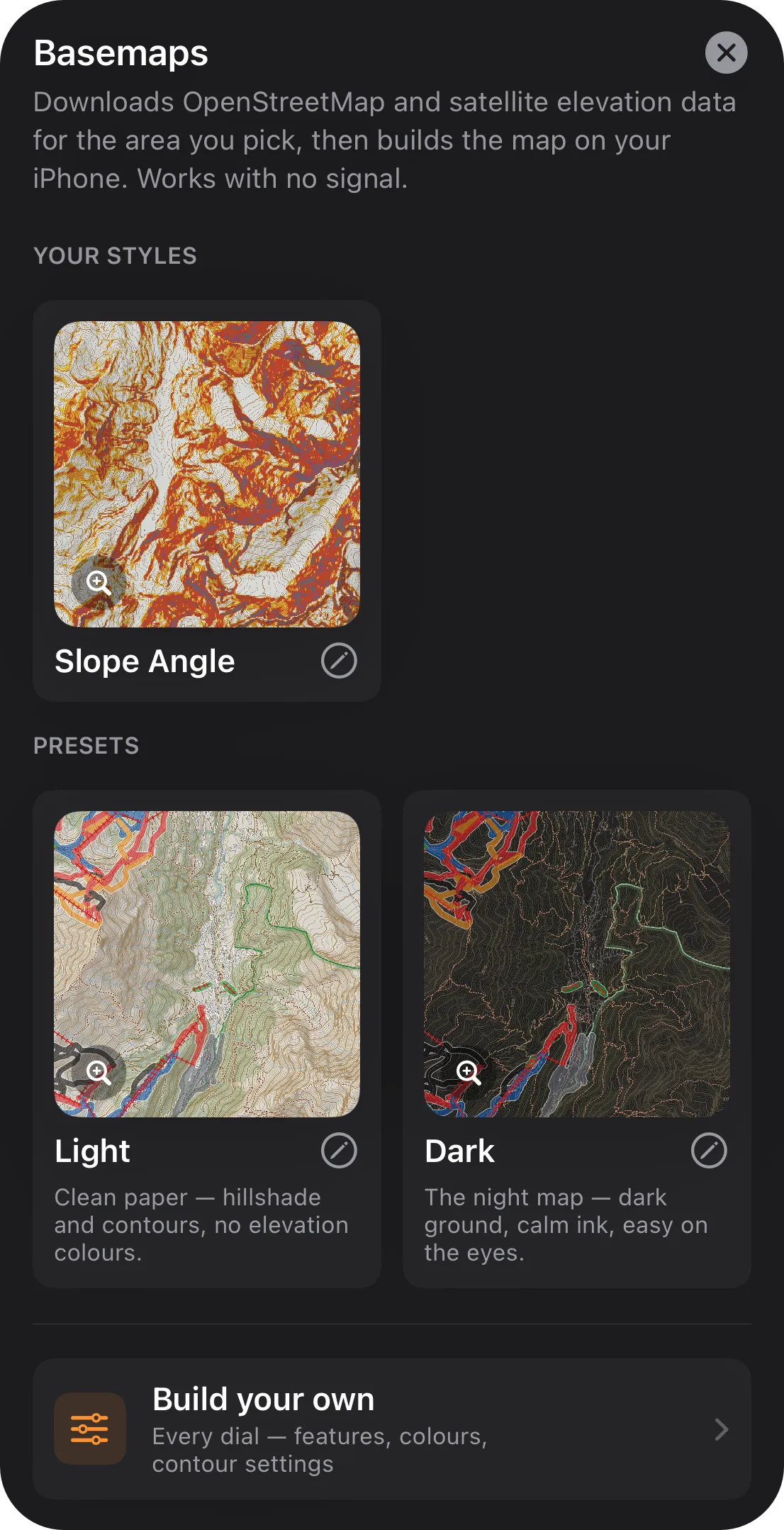
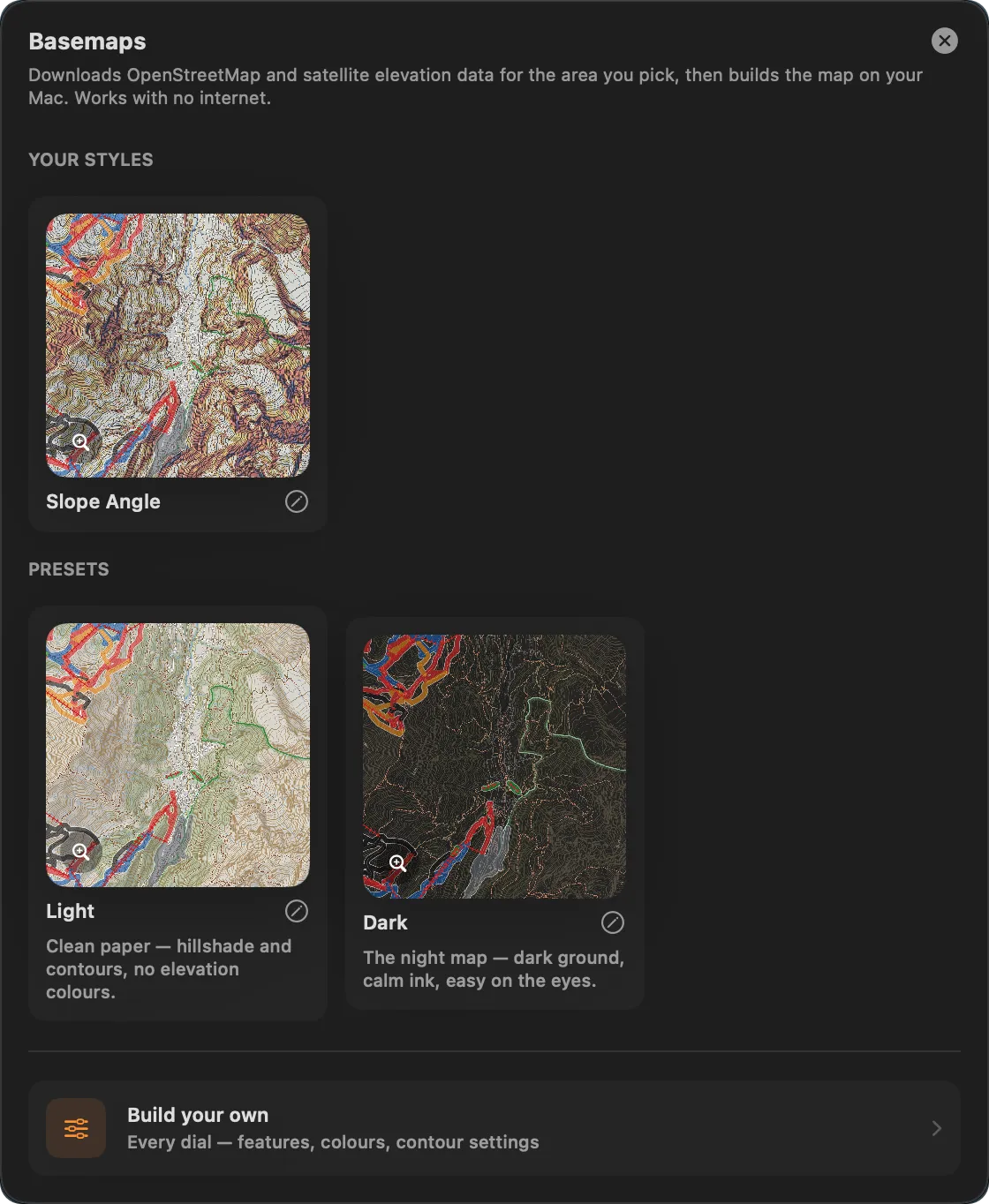
Each area builds in that look with no setup page. To change anything first, tap the pencil beside a look, or Build your own: the tool card’s button then reads Next and opens the setup page.
Light and Dark draw shaded relief and contours over a solid pale or dark ground, without elevation colours, and turn on all nine map features, so either one downloads the area’s map data. Their contour interval follows Settings → Units & Coordinates → Units: 20 m for Metric, 80 ft for Imperial.
Building or restyling a basemap is part of the full app; a basemap already in a project draws without it.
Picking the area
Section titled “Picking the area”Each tap picks a quarter of a 1° square; the quartered-square button on the tool card switches to whole squares. Picking one form clears the other in that square. The ↺ on the tool card clears every picked area. Each area becomes its own basemap and row; they build square by square, north to south, then west to east.
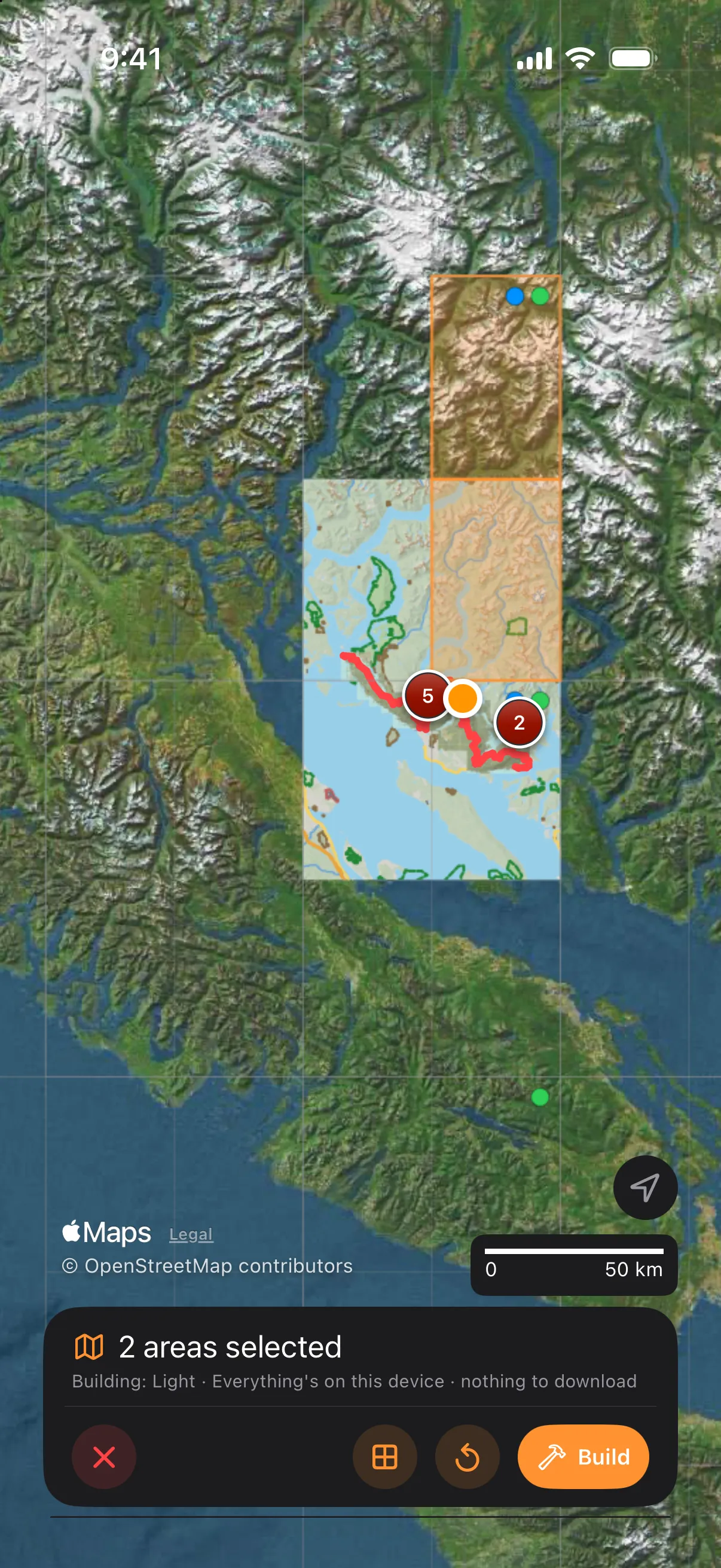
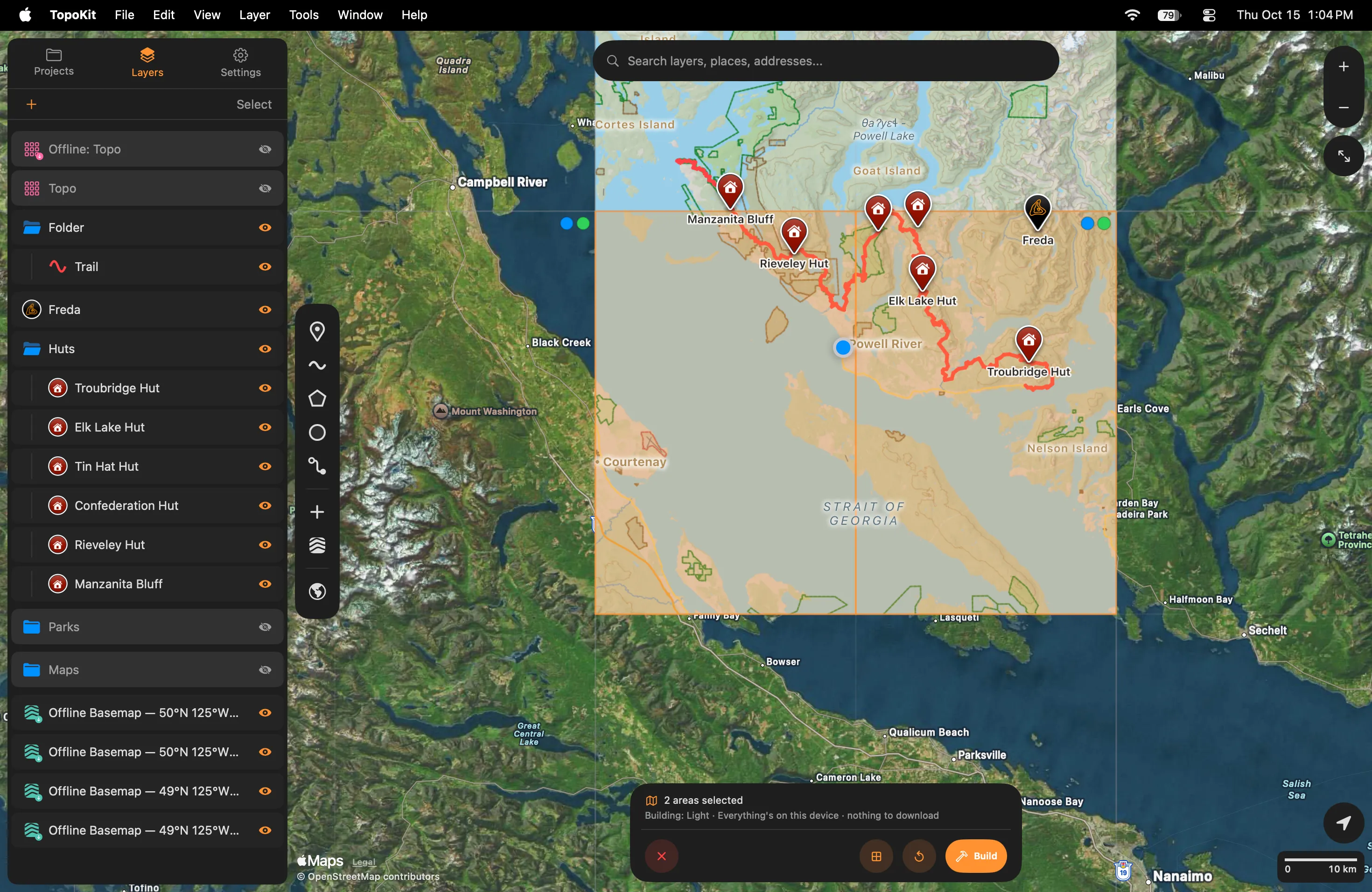
In a square’s top-right corner, a green dot means its elevation data is on this device, a blue dot means its map data is, and a blue ring means map data for only some quarters. A quarter still downloads its square’s whole elevation tile, 25–40 MB, which the other quarters and the elevation tools reuse.
The setup page
Section titled “The setup page”On iPhone, Build Offline Basemap opens as a page in the Layers tab. On Mac, Build Offline Basemap opens over the map; Esc closes it, and Return does not start a build.
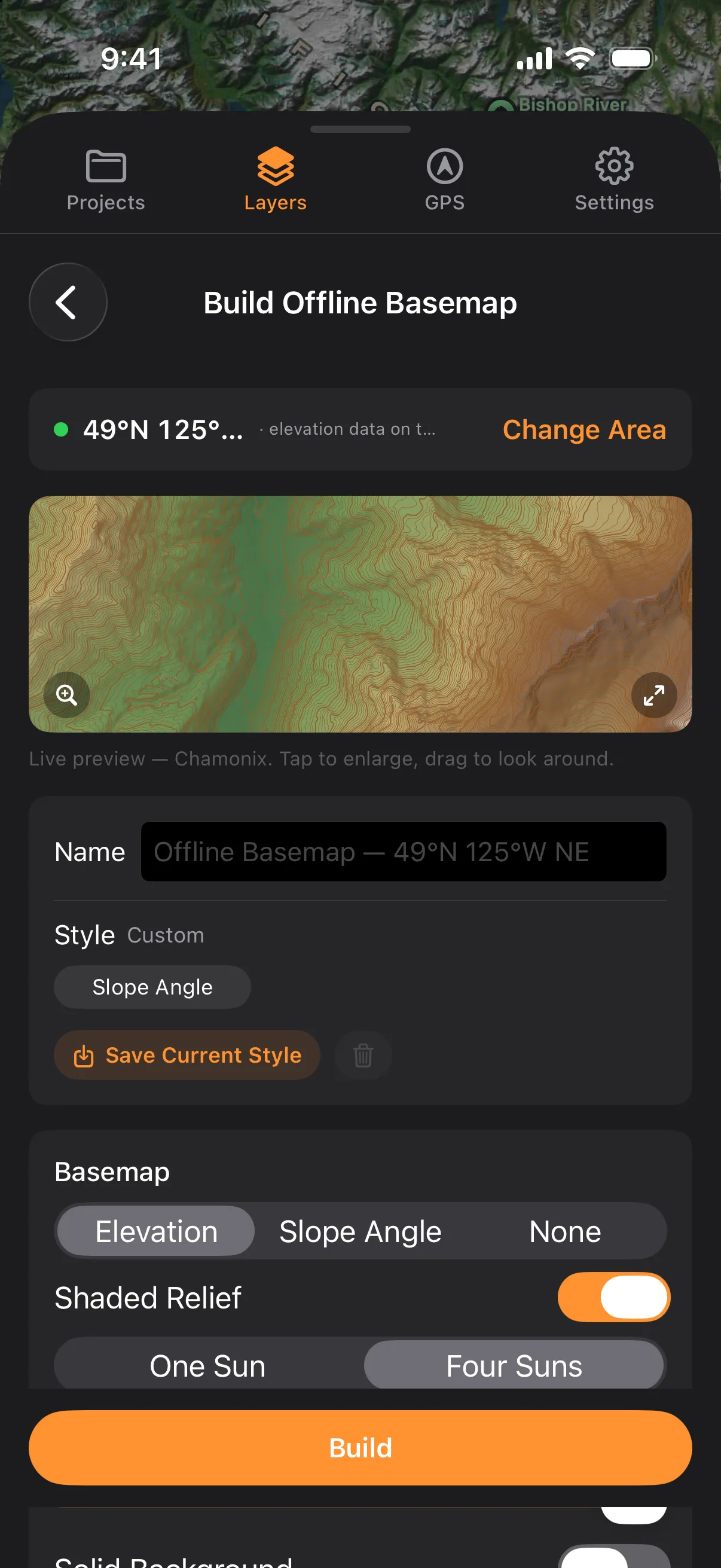
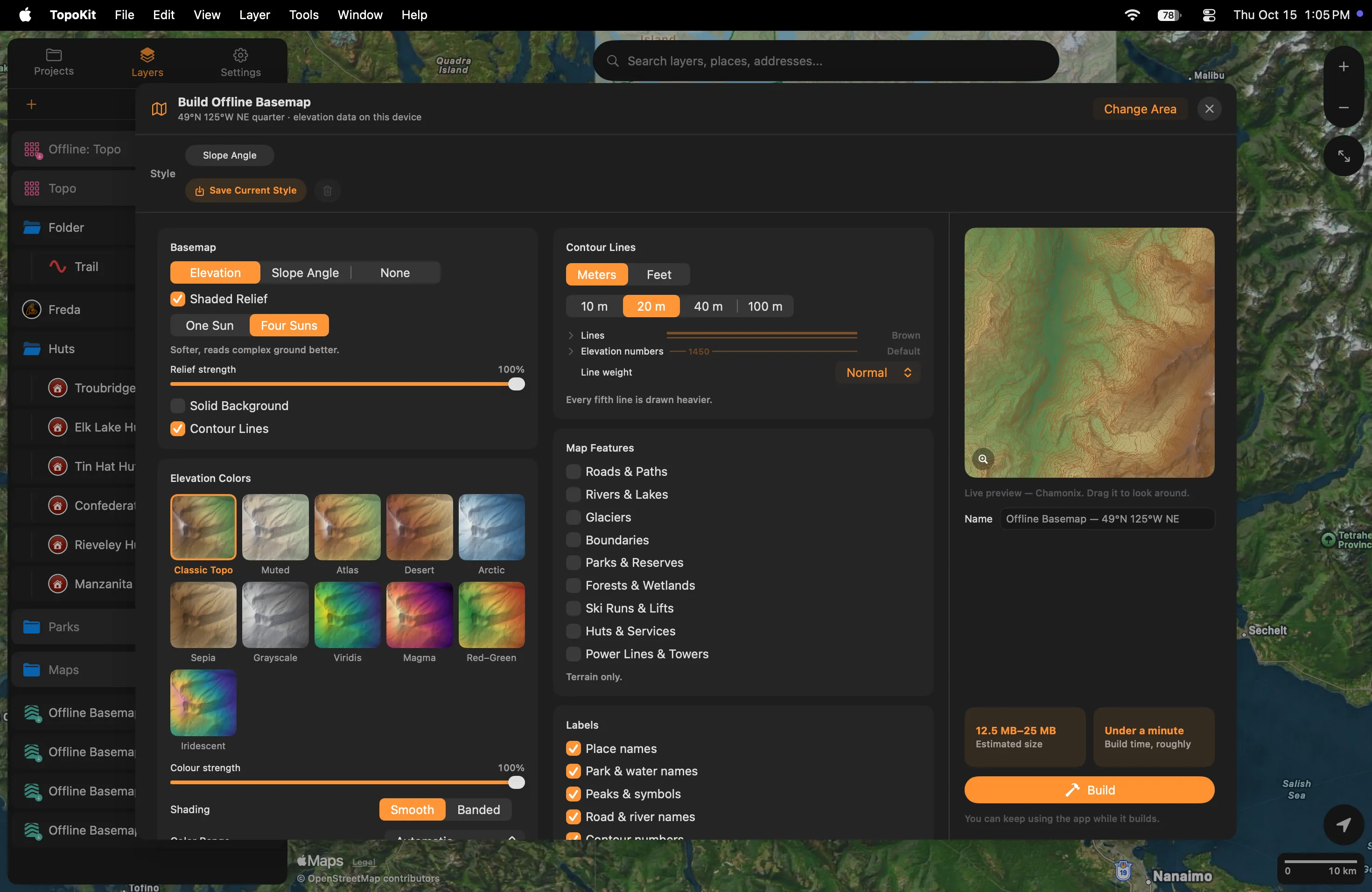
Change Area returns to the map and keeps every setting and the name; closing the setup any other way discards them. Name applies only when one area is picked; with several, each basemap is named for its own square.
The build button stays grey until relief, a coloured ground or contours is on.
Ground and relief
Section titled “Ground and relief”The first control on the Basemap card picks the coloured layer under the relief.
- Solid Background: on, the basemap covers Apple Maps where it draws, on the ground colour set by Background; off, the relief shades Apple’s map, elevation or slope colours cover it unless their strength is lowered, and Apple’s names stay on top (draw order).
- Elevation Colors: Color Range on Automatic matches a basemap built nearby so neighbours share one scale, and an edit keeps the range the basemap was built with; This area only can change colour at the shared edge.
- Slope Angle: pale under 27°, yellow 27–29°, orange 30–34°, red 35–45°, violet 46–50°, blue 51° and steeper.
The strength sliders stop at 15%; switch a layer off to remove it.
Contour lines
Section titled “Contour lines”Meters or Feet starts from Units and is stored with the basemap: changing Units later relabels neither its contours nor its peak heights. Elevation numbers colours the contour heights and also the names and heights of peaks, huts and places.
Map features
Section titled “Map features”Nine switches choose what the map data draws; Reading the map lists what each one shows. Turning on any one downloads the map data for all nine in that area, a few megabytes, so the others can be turned on later with no connection.
A colour left on Default follows TopoKit’s colour for that feature, so an app update can change it; a swatch or custom colour stays. A weight set to Off removes that kind of line; for roads, trails and tracks it removes their names too, while river names stay. Road weight also covers railways, ferry routes, runways and taxiways, and Run weight covers lifts; trails follow Road weight until you choose a Trail weight, and tracks follow Trail weight until you choose a Track weight. Run colours on Automatic uses North American difficulty colours for a basemap centred between 170° W and 30° W, European everywhere else.
Labels
Section titled “Labels”Each switch on the Labels card redraws the map at once, with no rebuild; the last column of Marks and names shows what each one covers. Road & river names also needs the map feature that draws the line.
Estimates and saved styles
Section titled “Estimates and saved styles”Estimated size and Build time, roughly use this device’s own pace once it has finished a build; until then the time reads A minute or two.
Save Current Style, on the setup page and in the editor, saves the look, map features, colours and contour settings for the chooser. Saving under a name already in use, in any capitals, replaces that style. Saved styles stay on this device and do not sync. To delete one, select its chip and tap the trash, or press and hold its card in the chooser (right-click on Mac) and choose Delete Style; basemaps built with it stay unchanged.
While it builds
Section titled “While it builds”One build runs at a time and the rest wait. Quitting TopoKit clears the queue. A build that finishes after you open another project adds no layer; run the same build in the original project and it is added without building again.
A download that stalls reads Waiting for connection… and resumes when data returns.
The ✕ on the bar stops the build; with areas queued, Stop Building? offers Stop This Area or Stop All. A stopped build adds no layer and loses nothing: building the same area again makes only what is missing. Deleting a basemap’s row while its area builds stops that build and drops its queued repeats.
On iPhone, a build keeps running after you leave TopoKit for as long as iOS allows, under a system progress item titled Building offline basemap. If iOS stops it, or you stop it there, it starts again when you come back, unless TopoKit was closed in between; only the ✕ on the progress bar stops it for good.
Over cellular data, the downloads follow Settings → Storage & iCloud → Large Downloads, and the bar reads Waiting for Wi-Fi… while one is held (downloads over cellular data).
The basemap in the Layers tab
Section titled “The basemap in the Layers tab”A basemap’s row is named for its square, such as Offline Basemap — 49°N 126°W, with NE, NW, SE or SW after it for a quarter. A download arrow badge means the basemap is built on this device; a dimmed icon with an orange hammer means it is not, and needs Build on This Device.
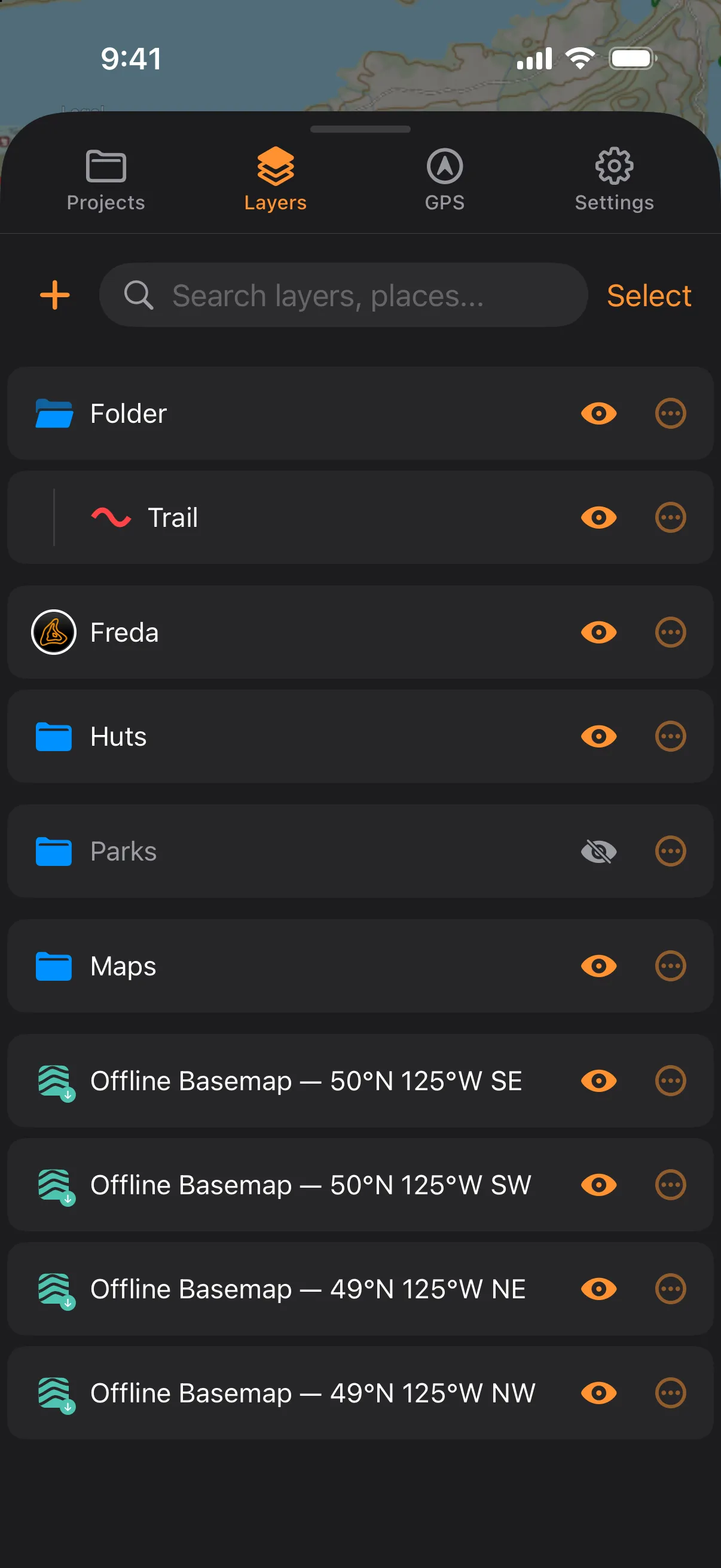
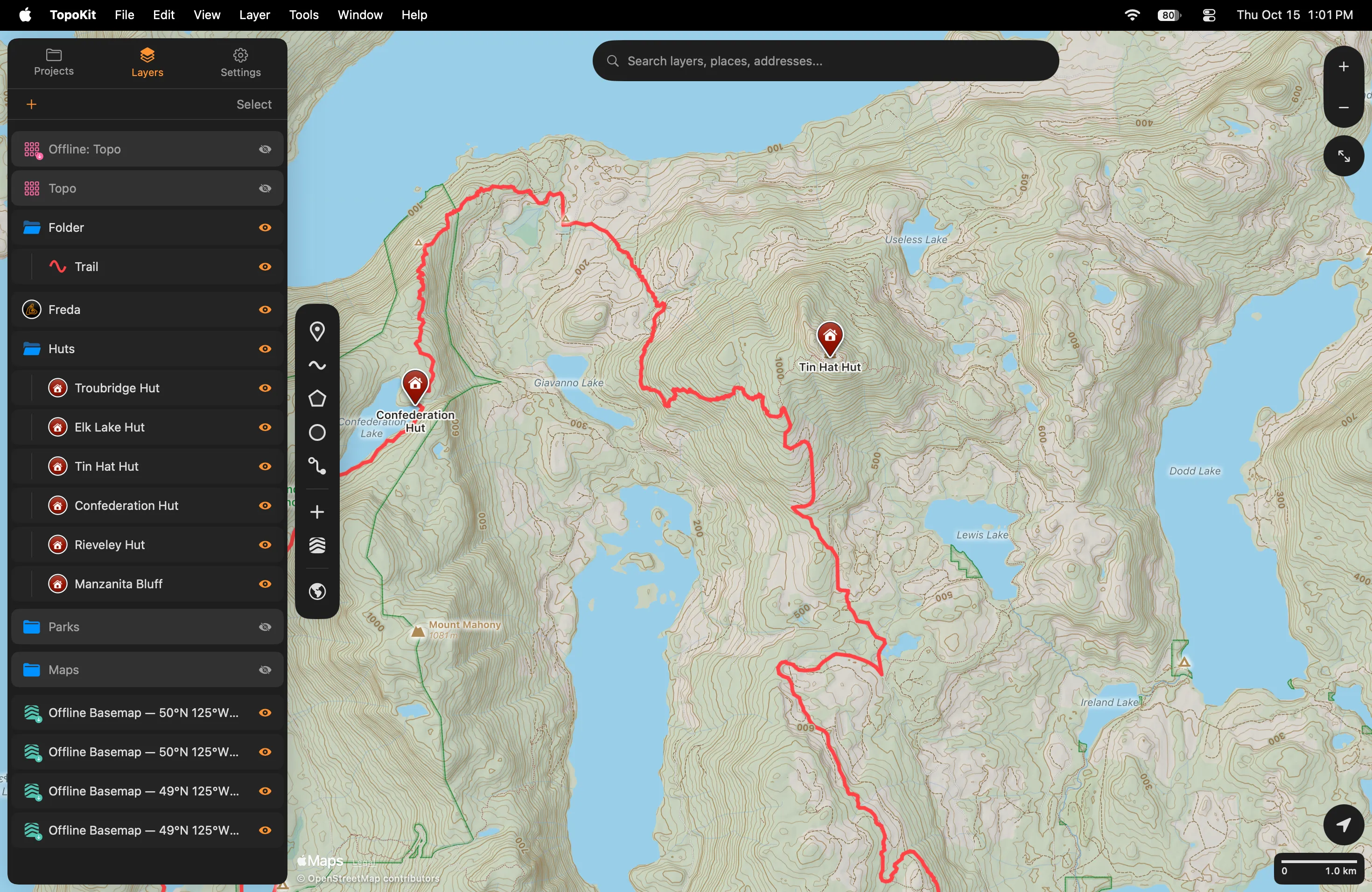
A new basemap goes to the bottom of the tree, so it draws under everything else, unless it overlaps a top-level basemap; then it goes directly above that one. Building the same area again updates its row instead of adding a second. A basemap cannot be copied or duplicated; build the area in the other project, which reuses what this device has made.
Editing a basemap
Section titled “Editing a basemap”On iPhone, tap the basemap’s row. The page Edit Offline Basemap has no Save: leaving it keeps every change, the name included. On Mac, click the row, or choose Layer → Edit Layer… (Cmd-I). Closing the popover Edit Offline Basemap keeps every change.
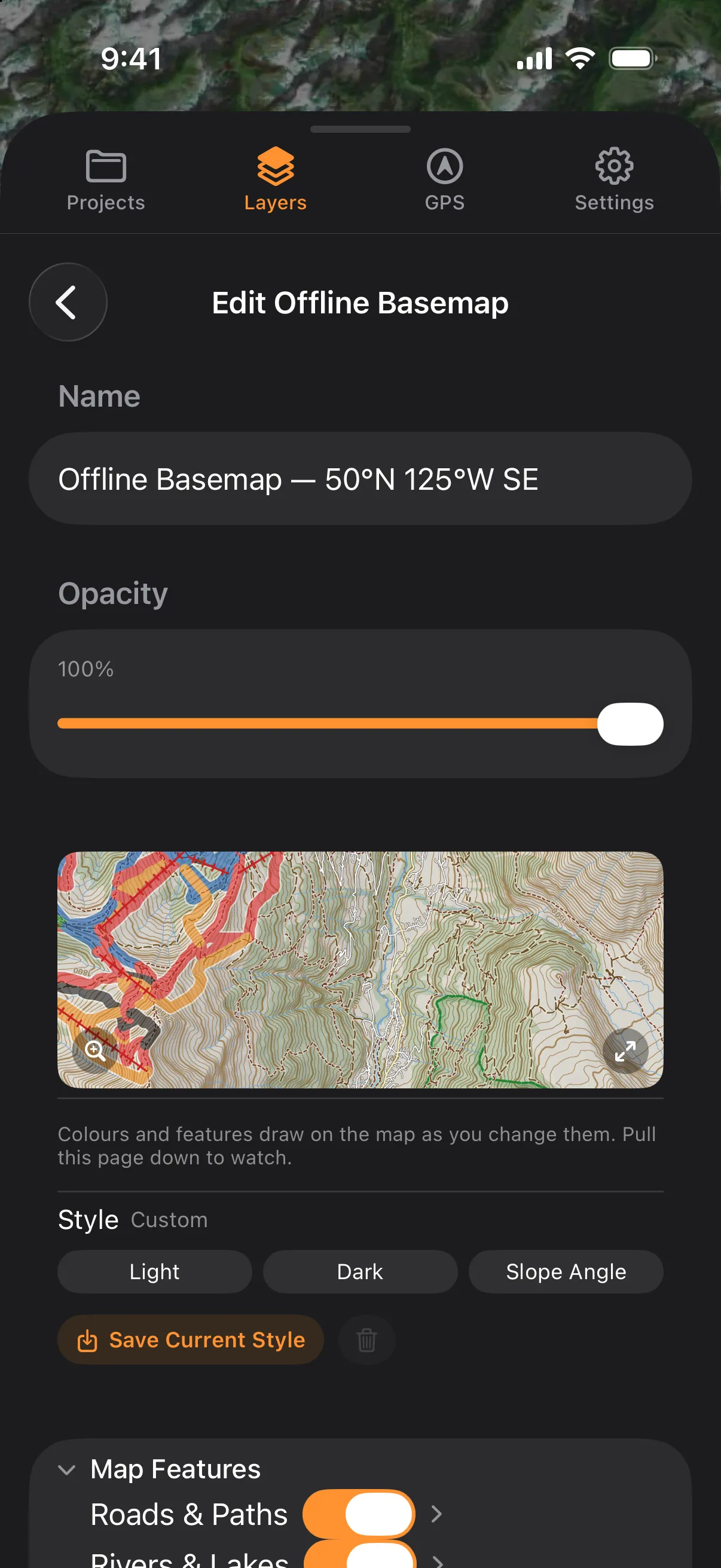
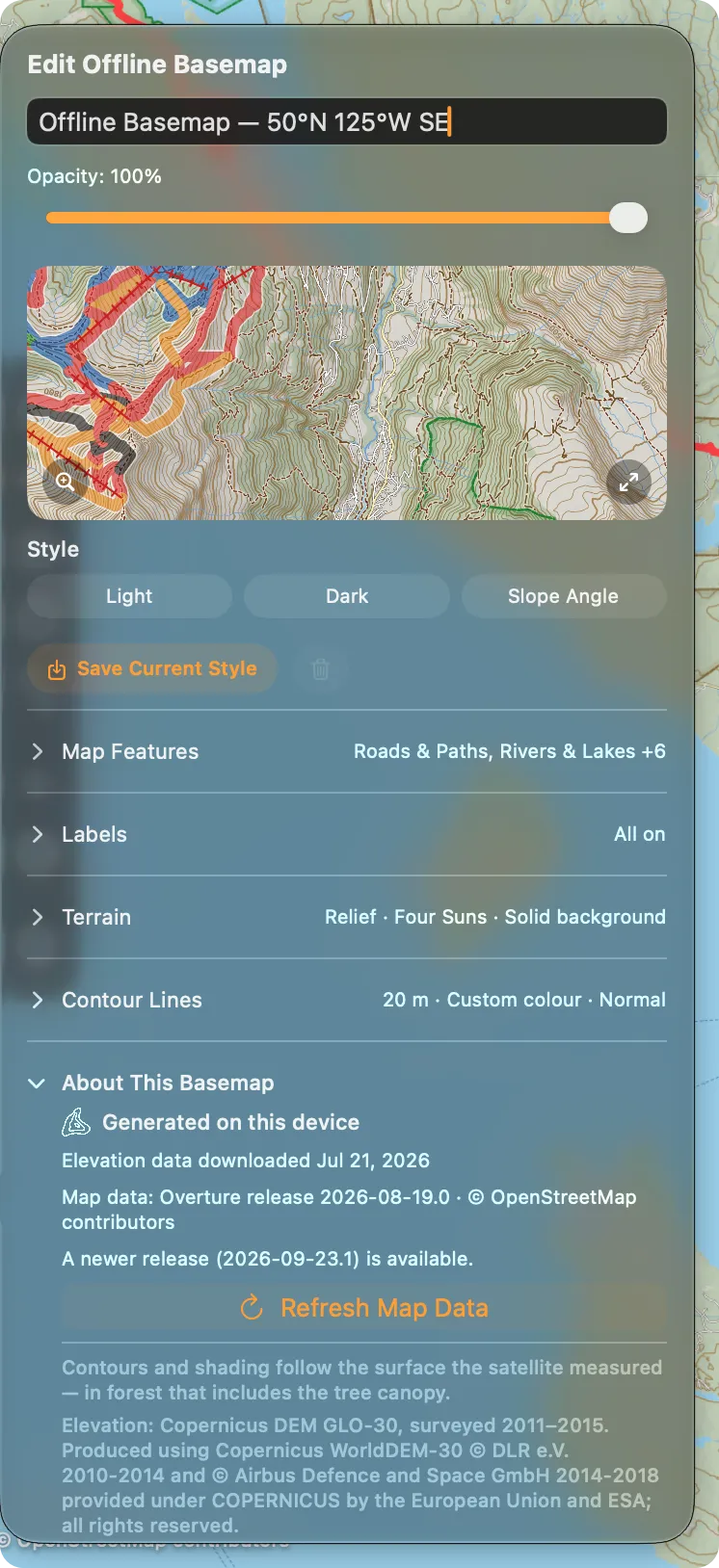
Every change is kept as you make it, and the map keeps drawing the previous version of a layer until the new one is made:
- Colours, weights, the Labels switches, and map features whose data is on the device: drawn at once, nothing to make.
- Solid Background and its colour, the strengths, and a look that recombines ground already made: drawn at once, finished when you close the editor.
- Another contour interval, other elevation colours or other relief lighting: made from the elevation data on the device when you close the editor.
- A map feature on a basemap built with none: the map data downloads when you close the editor.
Until it is made, the section holding that change shows ⏱ before its summary.
To add contours, switch on Contour Lines under Terrain.
An edit never deletes ground already made. Undo Changes, in the footer while a change waits, returns the basemap to how it was when you opened the editor, except its name and Opacity; basemap edits are not on the app’s undo history.
Map data does not update on its own. Opening the editor with a connection checks for a newer release, and About This Basemap then offers Refresh Map Data.
Other projects and other devices
Section titled “Other projects and other devices”A basemap’s ground (its shading, colours, contours and map data) is stored once per 1° square on each device and shared by every basemap covering it; each project keeps its own look, so two projects can show one square as Light and as Dark without a second download.
A basemap’s settings sync with the project; its built files stay on the device that built them and are left out of device backups.
When a project opens, whatever its basemaps need that the elevation data on this device can make is made without asking. If a basemap needs data this device does not have, TopoKit asks Build Basemaps on This Device? once per project until it quits.
Build on This Device, in the row’s menu, in the editor and, on Mac, in the Layer menu, builds one basemap with the same area, settings and name. It is offered only while the basemap has nothing on this device.
Storage
Section titled “Storage”Delete Offline Basemaps, in Settings → Storage & iCloud → Offline Basemaps, deletes every basemap’s built files and map data on this device. The rows stay in their projects with the hammer badge until rebuilt. Deleting one basemap’s row removes only ground no other basemap uses, and keeps the area’s map data.
Clear Elevation Data leaves built basemaps in place; a later change that needs new ground downloads the elevation tile again. Clear Downloaded Map Tiles also deletes basemaps’ map tiles, which are made again from the elevation data when the project next opens (Storage & iCloud).
Credit and licences
Section titled “Credit and licences”While a basemap with map features is visible in the Layers tab and its area is in view, the map shows © OpenStreetMap contributors under Apple’s Legal link at the bottom left; tapping it opens the map data’s copyright page.
Settings → About TopoKit → Licenses, and on Mac Help → Licenses, credits the elevation data and the map data.
Reading the map
Section titled “Reading the map”Everything in these tables except contours comes with the map data, so it needs at least one map feature on. Colours are the Light look’s; Dark and the colour rows change them.
A mark with no name is drawn at two-thirds size, except springs, hot springs, geysers, drinking water, toilets and information. When labels collide, settlements win, then area names and named huts, hospitals, ranger stations and lookouts, then named peaks with a height, then other named marks. Of the lines, trails, tracks, ski runs and lifts answer a tap along their length, and so do footpaths, cycleways, steps, sidewalks and crossings close in; roads, rivers and ferry routes answer only where their name is printed.
Marks and names
Section titled “Marks and names”| Card says | On the map | Shown by |
|---|---|---|
| Peak, Volcano | Triangle (cone for a volcano), name and height in the contour unit; ranges not marked | Peaks & symbols |
| Point of interest | Small dot with a height: an unnamed summit; none without a height | Peaks & symbols |
| Pass, Cliff, Rock, Cave, Waterfall | Close in; the name a step later | Peaks & symbols |
| Spring, Hot spring, Geyser, Reef | Water blue | Peaks & symbols |
| Campsite | Tent; commercial campgrounds also need Huts & Services | Peaks & symbols |
| Hut | Lodges, cabins and hostels | Huts & Services, Peaks & symbols |
| Hospital, Ranger station, Pharmacy, Grocery, Fuel | Hospitals and ranger stations named from the start, the rest close in; no hotels, restaurants or police | Huts & Services, Peaks & symbols |
| Lookout tower | Named; within 200 m of a peak it shows the peak’s height | Peaks & symbols |
| Radio tower | Cell masts not marked | Power Lines & Towers, Peaks & symbols |
| Viewpoint, Picnic site, Drinking water, Toilet, Information | Close in; drinking water in the land colour, so blue means a natural source | Peaks & symbols |
| Gate, Barrier | Never named | Peaks & symbols |
| Airport, Seaplane base, Heliport, Ferry terminal | Runways are drawn as lines | Peaks & symbols |
| Railway station, Border crossing | Only when named | Peaks & symbols |
| City, Town, Village, Hamlet, Locality, Neighbourhood | The name is the mark, ranked by prominence, not by the card’s word; a dot only at the widest views | Place names |
| Bay | Name only | Place names |
| Park, Indigenous land, Forest, Military area, Glacier, Island, Water, Sea | One name per area, in its colour; all but island names a few per screen; water, sea and island names drop out close in | Park & water names |
| Cape, Dam | Name only; a dam also needs Rivers & Lakes | Park & water names |
Lines, edges and tints
Section titled “Lines, edges and tints”| Feature | On the map | Switch |
|---|---|---|
| Highway, Primary road, Secondary road | Widest; amber, yellow, pale yellow, dark edge | Roads & Paths |
| Tertiary road, Minor road, Residential street, Service road | White, dark edge; unpaved keeps its colour with a dashed edge | Roads & Paths |
| Track | Long brown dash, pale halo | Roads & Paths |
| Trail, Bridleway | Short brick-red dash, pale halo; a named footpath or cycleway draws as a trail | Roads & Paths |
| Footpath, Cycleway, Steps, Sidewalk, Crossing | Short grey dashes; sidewalks and crossings thin solid pale grey | Roads & Paths |
| Railway, Ferry route, Runway, Taxiway | Thin dark-grey dash; thin dashed blue; solid grey | Roads & Paths |
| River, Stream, Canal; lakes, reservoirs, sea | Blue lines, rivers heaviest, seasonal streams dashed; water bodies one flat blue | Rivers & Lakes |
| Dam, weir | Grey area or bar; a weir dashed | Rivers & Lakes |
| Glacier | Translucent white-blue, thin dashed blue edge | Glaciers |
| Borders | Plum, land only: country dash-dot-dot, province or state dash-dot, county or district short dashes close in | Boundaries |
| Park and reserve edges | Dashed edge, soft inner band: green park, brown indigenous land, dark green forest reserve, muted red military | Parks & Reserves |
| Forest, wetland, scrub, grass, moss, cropland, snow | Tints mixed into the relief, fading close in | Forests & Wetlands |
| Ski run | Translucent band. Easy green, intermediate blue (North American), or easy blue, intermediate red (European); advanced black, novice green, freeride orange, unrated grey | Ski Runs & Lifts |
| Gondola, Chairlift, Cable car, Surface lift | Red line with crossbar ticks | Ski Runs & Lifts |
| Power line | Fine slate line, pylons as small squares close in; distribution lines not drawn | Power Lines & Towers |
| Contour | Brown; every fifth heavier, with its height | Contour Lines; Contour numbers |
Why does the shading go soft when I zoom in close? Relief, colours and slope are made at one level of detail from 30 m elevation samples and enlarged past it. Two levels past it they ease toward the Background colour; with Solid Background off there is nothing to ease toward. Contours, features and names are drawn as lines and stay sharp.
Can I get a deleted basemap back? Not with Undo: deleting a basemap registers no undo step. Build the same area again: the ground this device still holds is reused.
Why are there no country names or sea depths? Neither is drawn: borders are never named, and the sea is one flat blue, part of Rivers & Lakes.